October 1, 2020 October 1, 2020 |
 368 views, 368 views,  0 comments 0 comments |
HOWTO| Run system restore with command prompt? ...
 If the problem is too severe, you can try to restore your Windows 10 to the previous state as long as you have enabled system restore. But, it will not restore documents, music, emails, or personal files of any kind. If this is what you need, see below.
To run system restore in safe mode, follow the steps below:
1. Start your computer and press "F8" repeatedly until the Windows advanced options menu appears.
2. Click "Safe Mode with command prompt" and press "Enter". If your computer can boot normally, type "cmd" in the search box and click "Command Prompt" to continue.
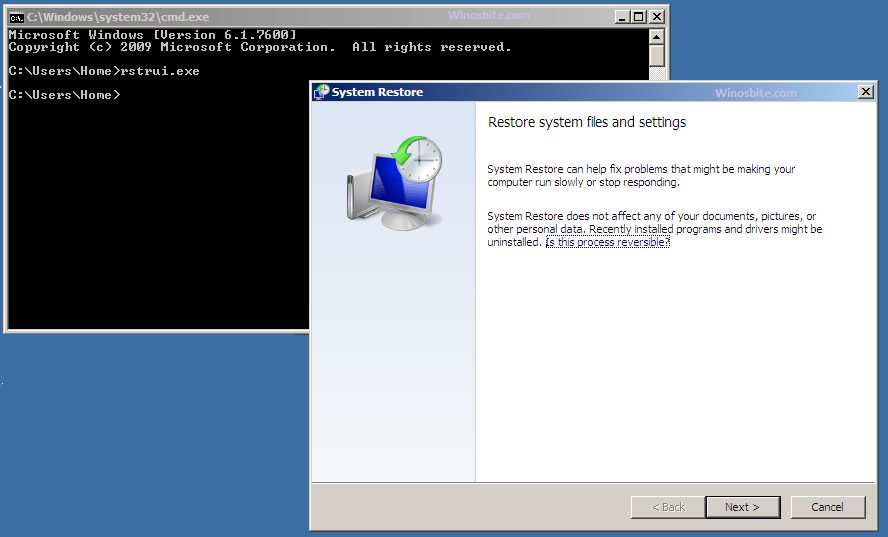
3. Sign in using an administrator account if needed. Once the command prompt is showing, enter "rstrui.exe" at first in the Command Prompt Window and press "Enter" to continue.
4. This command will bring you to the interface of System Restore. You can either use the recommended restore point or click "Next" to choose an available restore point. Then, follow the instruction to complete system restore.
|
 Comments 0 Comments 0
There are no comments ......
 Note: Note:
Guests comments are allowed ...
|
|
|
|
|
|