July 4, 2014 July 4, 2014  307 views, 171 downloads, 307 views, 171 downloads,  0 comments 0 comments |
|
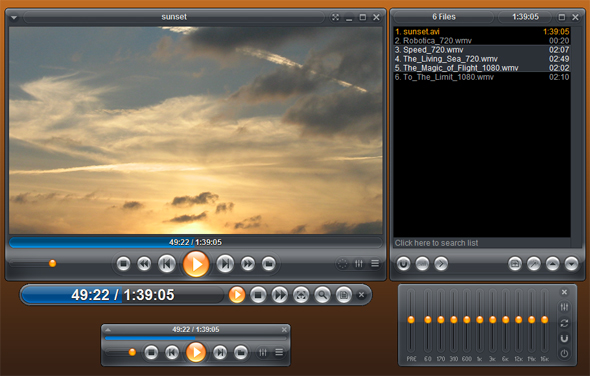
TORRENT | Zoom Player Home FREE 9.1.0...
|
|

* The left mouse click can now be set to "Mouse Gestures".
* You can now assign 4 mouse gestures (up/down/left/right) when gesturing with the mouse while holding down the left mouse button or by swiping a finger on touch displays a forth of the way across the screen.
- By default the assigned functions are:
>; Left : Medium seek backward
>; Right : Medium seek forward
>; Up : Previous Track
>; Down : Next Track
^ All gestures can be assigned a custom function in the MAX version.
* xySubFilter support for full resolution subtitle rendering when playing lower resolution video content. MadVR must be used as the video renderer for xySubFilter to function.
^ Please note that the current version of xySubFilter may break ffdshow subtitle rendering if the xySubFilter filter is registered.
* The XInput (XBOX360 and compatible controllers) interface can now assign Zoom-in and Zoom-out functions to the left and right Trigger buttons.
* New Setting (Adv. Options / Interface / Control Bar / Timeline Area) that displays chapter points on the timeline. When the mouse hovers over a chapter point, a pop-up shows the chapter name. This feature requires a skin that includes additional chapter-point graphical elements. The Onyx and Alba skins include this support.
* New Setting (Adv. Options / System / Screen Saver) to always disable the windows screen saver and monitor powerdown while Zoom Player is running.
* New Setting (Adv. Options / Interface / Mouse) that enables the Mouse's middle click (wheel click) to reset DirectShow Zooming.
* New Settings (Adv. Options / Interface / Mouse) that enable the Mouse's left click combined with holding either the Alt or Ctrl keys to pan the DirectShow Zoomed video (panning is currently limited to the EVR video renderer).
* New Setting (Adv. Options / Interface / Mouse Wheel) that allows the DirectShow Zoom In/Out functions to be assigned to the mouse wheel.
* New extended "exDirectShowZoom" function used to specify a zoom-in factor when using a DirectShow video renderer. Unlike standard Zoom-in, DirectShow based zooming works even in windowed mode.
* New "fnDSZoomIn" and "fnDSZoomOut" functions that Zoom into and out of the video area when using a DirectShow video renderer. Unlike standard Zoom-in, DirectShow based zooming works even in windowed mode.
* New Comm API message #1705 notifying of a subtitle stream change.
* New Comm API message #1605 notifying of an audio stream change.
* New "TimelineChapters" and "TimelineCBarChapters" skin ing functions used to specify coordinates for the timeline chapter marks.
* Comm API message #1702 (get subtitle stream names), only worked in DVD mode. It now works for media mode subtitle steams as well.
* The 'Current Position' is now horizontally centered in the chapter editor.
* The font size used when creating contact sheets was too small, making the text unreadable when creating lower resolution contract sheet images.
* Restored subtitle compatibility with the latest version of ffdshow. Using the ffdshow subtitle rendering option should now work.
* Playing media files with both embedded and external subtitle tracks with the embedded subtitle tracks set as both not-default and not-forced, the next subtitle track function would require several tries to properly show the correct subtitle track and at times, the OSD pop-up may have shown the wrong active subtitle track name.
* Adding a chapter point to a media file would list the new chapter in the wrong order within the chapter editor.
* Removing chapters using the chapter editor did not prompt to erase the chapter files when all chapters were removed, causing the chapters to re-appear after re-loading the media.
* Using the next/previous chapter buttons would pop an action OSD containing character encoding instead of the actual character. For example "&;comma" instead of ",".
* The 'Show OSD filename when opening a new file' setting stopped working.
* Detaching the Control Bar when using MadVR as the video renderer would cause the control bar to appear twice under certain circumstances.
* Setting the control bar to appear at the top/bottom of the screen instead of the video area would not work when using MadVR as the video renderer.
* Disabling the "Auto Play" setting broke the "Automatically restore the last media position on replay" feature.
* With "Auto-Size User Interface to fit Source Video Resolution (on load)" and "Limit Auto-Size to User Interface Height" settings enabled, playing a video while fullscreen and then exiting fullscreen would have resulted in a window the same size as the source video's full resolution instead of only adjusting the height to compensate for the aspect ratio.
* Searching for some buttons using the options dialog's search feature would prevent the searched buttons from being clicked until the search dialog was closed first.
* Enabling the 'Always start with media subtitles hidden' setting would cause a 'Play' OSD to pop-up when playing a media file containing subtitles.
* The current time and date did not appear on any fullscreen navigation interface based on the virtual keyboard (Rename, New Folder, etc).
|
--------------------------------------------------------------------------------------------
--------------------------------------------------------------------------------------------
|
Similar files: |
Downloads: |
 Comments 0 Comments 0
There are no comments ......
 Note: Note:
Guests comments are allowed ...
|
|
|
|
|
|
|
|
|