TrayStatus runs in your system tray and indicates the status of your CapsLock, NumLock and ScrollLock keys, which can be useful if your keyboard does not come with an indicator light.
In addition, the program also displays an icon that shows your current read/write disk activity, with read/write speeds provided via tooltip. You can choose which indicator icon(s) you want to program to show in the system tray.
This is one of my go to apps. Free for personal. I usually only use the Numlock and Caplock settings. This is great for keyboards that have no indicator lights built into the keyboard. Even if they are there you do not have to move you hands to see the status of the keyboard settings.
Many laptops also do not have these indicators so this is a great help. Just make sure to set the icons to always show on the notifications area. The only thing that would make this better as far as I am concerned would be if the CD Rom if you still have one could be monitored.











 (1)
(1)  December 20, 2025
  460 views, 83 DLs,
  1
1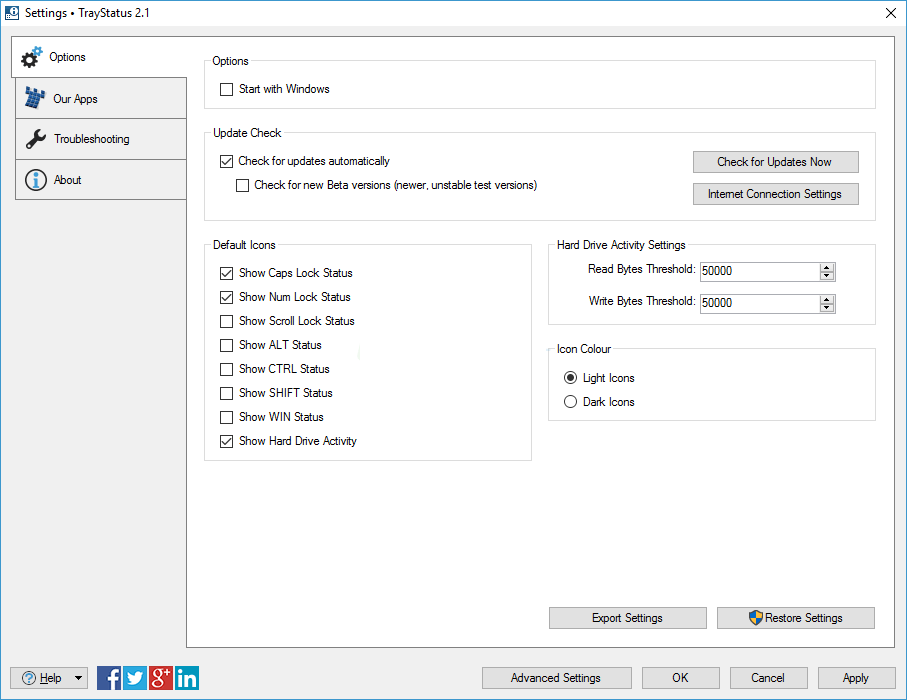


 No Virus


