 |
| |
DOWNLOADS: 51
Your downloads should start automatically
If it does not, click restart.
|
|
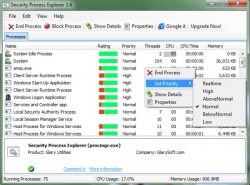
| <b><font size="3">Security Process Explorer</font></b> is an enhanced task manager, that provides advanced information about programs and processes running on the computer. It displays all the standard information, including file name, directory path, description, CPU usage, as well as a unique security risk rating. This rating is conclusive and relies on the expertise of the user to determine whether the process should be terminated or removed.<br><br>It displays all standard information, including file name, directory path, description, CPU usage, and unique security risk level. The program interface has a logical structure and is based on the default task manager, and the process of replacing it is very fast, so we will soon forget that we have used the default tool.<br><br>Security Process Explorer allows you to monitor the CPU and memory usage graphs of each process, view detailed process information (with description), stop and start new processes, set priorities, and more. The tool analyzes your system and creates a list of all currently active applications and processes. Each application and process is supplemented with additional data, such as CPU and memory usage, threads, priority, and given according to the program The trust level of the rating users themselves.<br><br><b><font size="3">Key Features:<br></font></b><br><ul><li>Give you detailed information about each and every process.</li><li>Indicate whether a process is safe or not.</li><li>Allow you to terminate process with a single click.</li><li>Let you block any unwanted processes or malware.</li><li>Simple and user-friendly interface.</li></ul>
|
|
Connecting you to "Glarysoft Ltd" ...

Added: Jun.10,2014 Size: 1.3mb Views:412
Author: Glarysoft Ltd
License: Freeware
Filename:
File: exe
Language: English
Requires: Windows 2000/ XP/ Vista/ Windows 7
|
|